Install Tools
This page is auto-generated. Regenerate with: dev-docs
dev-setup
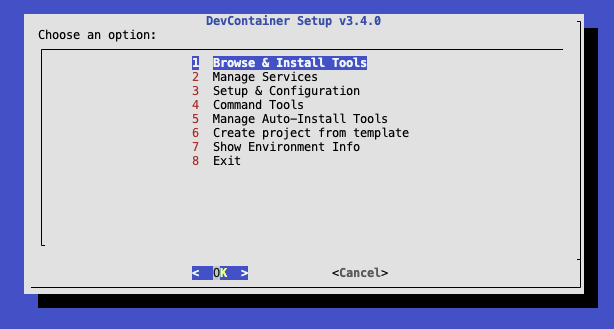
Run dev-setup to install development tools. The interactive menu lets you browse and install any of the available tools.
Quick Reference
| Command | Description |
|---|---|
dev-check | Configure and validate Git identity and credentials |
dev-env | Show installed tools and environment info |
dev-help | Show available commands and version info |
dev-log | Display the container startup log |
dev-services | Manage background services (start, stop, status, logs) |
dev-template-configure | Configure services for installed template |
dev-template | Create project from template |
dev-tools | Output machine-readable tool inventory as JSON |
dev-update | Update devcontainer-toolbox to latest version |
dev-setup | Interactive menu for installing tools and managing services |
dev-cubes | Generate homepage floating cubes configuration |
dev-docs | Generate documentation (tools.md, commands.md) |
dev-logos | Process logo images to production-ready WebP format |
dev-test | Run static, unit, and install tests |
System Commands
dev-check
Configure and validate Git identity and credentials
dev-check
dev-check --show    # Show current configuration
dev-env
Show installed tools and environment info
dev-env
dev-help
Show available commands and version info
dev-help
dev-log
Display the container startup log
dev-log
dev-services
Manage background services (start, stop, status, logs)
dev-services
dev-services status          # Show status of all services
dev-services start <name>    # Start a service
dev-services stop <name>     # Stop a service
dev-services logs <name>     # View service logs
dev-template-configure
Configure services for installed template
dev-template-configure
dev-template
Create project from template
dev-template
dev-tools
Output machine-readable tool inventory as JSON
dev-tools
dev-update
Update devcontainer-toolbox to latest version
dev-update
dev-update --force   # Force update even if same version
dev-setup
Interactive menu for installing tools and managing services
dev-setup
Contributor Tools
dev-cubes
Generate homepage floating cubes configuration
dev-cubes
dev-docs
Generate documentation (tools.md, commands.md)
dev-docs
dev-logos
Process logo images to production-ready WebP format
dev-logos
dev-test
Run static, unit, and install tests
dev-test
Running Install Scripts Directly
All install scripts can also be run directly:
# Show help for a script
.devcontainer/additions/install-dev-python.sh --help

# Install with specific version
.devcontainer/additions/install-dev-golang.sh --version 1.22.0

# Uninstall
.devcontainer/additions/install-dev-golang.sh --uninstall
Use dev-setup for the interactive menu, or run scripts directly for automation.