Developing Using AI
Watch an AI implement a complete feature in 12 minutes:
 Full implementation at 4x speed (~3 min). The user mostly just confirms each phase.
Side note: We used an AI to figure out how to create this screen recording. See the AI Developer section for examples of AI research tasks.
This is Claude Code adding Bash development tools to devcontainer-toolbox. The AI:
- Created the install script
- Added VS Code extensions
- Ran tests to verify everything works
- Updated documentation
How? Three things made this possible: a cage, a plan, and tests.
1. The Cage: Keep AI Contained
AI coding assistants can read files, write code, and run commands. You don't want them doing this on your main machine.
Run the AI inside a devcontainer.
┌─────────────────────────────────────────────────┐
│  Your Machine                                   │
│                                                 │
│  ┌───────────────────────────────────────────┐  │
│  │  Devcontainer (the cage)                  │  │
│  │                                           │  │
│  │  ┌─────────────────────────────────────┐  │  │
│  │  │  /workspace (your repo)             │  │  │
│  │  │  - AI can only see this folder      │  │  │
│  │  │  - All changes are visible to you   │  │  │
│  │  └─────────────────────────────────────┘  │  │
│  │                                           │  │
│  └───────────────────────────────────────────┘  │
│                                                 │
│  ~/Documents, ~/.ssh, ~/other-projects          │
│  (AI cannot access these)                       │
│                                                 │
└─────────────────────────────────────────────────┘
The devcontainer is isolated. It can't see your home directory, SSH keys, or other projects. If something goes wrong, rebuild and start fresh.
2. The Plan: Stop AI from Hallucinating
Without guidance, AI assistants:
- Jump straight into coding without understanding the scope
- Invent file locations that don't exist
- Create code that doesn't match your patterns
- Forget steps mid-implementation
Make the AI create a plan first.
Instead of "implement feature X", say:
we need to create a plan for creating a install-dev-bash.sh
The AI reads your documentation and creates a structured plan:
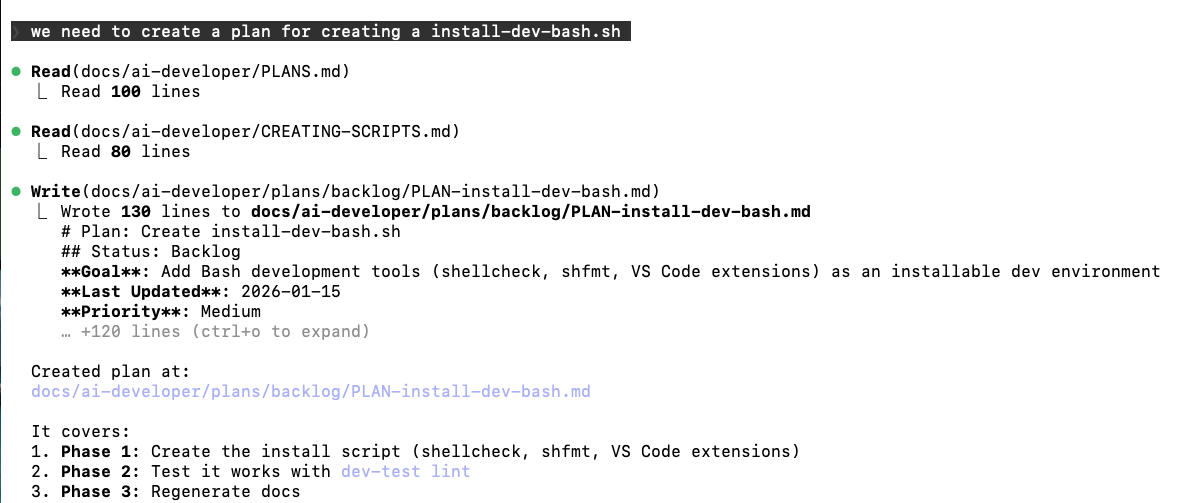
Notice what happens:
- AI reads your plan templates
- AI reads your code conventions
- AI creates a phased plan with specific tasks
- You review before any code is written
The plan is a markdown file. Edit it if something's wrong. Only after you approve does the AI start coding.
See the actual plan used in the demo: The PLAN-install-dev-bash.md is in website/docs/ai-development/ai-developer/plans/completed/.
More examples in the AI Developer plans section.
Why Plans Work
They reduce hallucinations. The AI follows your documented patterns instead of guessing.
They enable course correction. When something goes wrong, point to the plan. There's a shared reference.
They create documentation. Completed plans show what was implemented and why.
3. The Tests: AI Self-Correction
Plans reduce errors but don't eliminate them. Tests catch what plans miss.
# AI runs tests after making changes
dev-test static install-dev-bash.sh

# Test failed: Missing SCRIPT_CATEGORY metadata
# AI: "I see the test failed. Let me add the missing metadata..."
When tests exist:
- The AI runs them after changes
- Failures tell the AI exactly what's wrong
- The AI fixes issues before you even see them
Tests turn the AI into a self-correcting system.
Setting Up Your Project
Planning Documentation
Create docs that tell the AI how to make plans:
| Document | Purpose |
|---|---|
| PLANS.md | Plan templates and structure |
| WORKFLOW.md | Implementation process |
| CREATING-SCRIPTS.md | Code conventions |
Plans are stored in website/docs/ai-development/ai-developer/plans/ with subfolders for backlog/, active/, and completed/.
See docs/ai-developer/ for the full setup.
Tests
Create tests the AI can run:
dev-test static    # Validate syntax and metadata
dev-test unit      # Run safe execution tests
dev-test lint      # Check code style
AI Configuration
Add a CLAUDE.md that tells the AI:
- Where to find planning docs
- What workflow to follow
- What tests to run
The Three Layers
| Layer | What it does |
|---|---|
| Devcontainer | Isolates AI to your repo - protects your machine |
| Plans | Guides AI behavior - reduces hallucinations |
| Tests | Validates AI output - catches mistakes automatically |
- Cage it - Devcontainer limits what the AI can access
- Guide it - Plans keep the AI on track
- Verify it - Tests catch errors before you do
Related
- AI Developer Docs - Planning templates and workflow
- Testing Guide - How to run and create tests
- CLAUDE.md - Project-specific AI configuration (in repo root)